

Shopable video
Shoppable video allows you to display products within engaging video content. Each video highlights one or more items and includes direct shopping links, enabling customers to purchase instantly while watching. This section enhances storytelling, boosts engagement, and helps increase conversions. It is fully responsive and adapts seamlessly to different screen sizes.
.png)
Section settings
General settings
.png)
| Setting | Description |
|---|---|
| Section width | 3 options for container
|
| Color scheme | Select colors from Theme settings -> Colors |
Section header settings
.png)
| Setting | Description |
|---|---|
| Subheading | The subheading of the section |
| Heading | The title of the section |
| Enable heading underline animation | Turn on an animated underline effect for headings. Switch off to keep a static look. |
| Underline style | Choose the underline's look. Include:
* Note: Only appears when Enable heading underline animation is enabled |
| Underline color | Pick the color used for the underline. * Note: Only appears when Enable heading underline animation is enabled |
| Description | The description of the section |
| Heading size | The size of the title:
|
| Alignment | The position of the heading and description.
|
Video settings
.png)
| Setting | Description |
|---|---|
| Video ratio | Determine the aspect ratio of your video.
|
| Video auto play | Enable the autoplay functionality of the video |
| Enable video sticky | Keep the video visible while scrolling in a small sticky player (pinned to a corner). Turn off to keep the video inline only. |
Carousel settings
.png)
| Settiing | Description |
|---|---|
| Items per row on desktop | Number of columns to display on desktop computers. Minimum: 2. Maximum: 4. |
| Column gap | 4 options for column gap
|
| Show navigation | Display the next and back controls for the carousel |
| Show pagination | Display the pagination for the carousel * Note: Pagination will automatically show on mobile if you display the number of items on mobile as 1 or 2 |
| Auto-change slide | When enabled, the carousel will run automatically |
| Change slides every | The running period of the carousel |
Mobile settings
.png)
| Setting | Description |
|---|---|
| Items per row on mobile | Number of columns to display on mobile devices. |
Section padding settings
.png)
| Setting | Description |
|---|---|
| Top | Customize the top margin of the section |
| Bottom | Customize the bottom margin of the section |
Section divider settings
.png)
| Setting | Description |
|---|---|
| Show divider | Display a dividing line to separate from the previous section |
Block settings
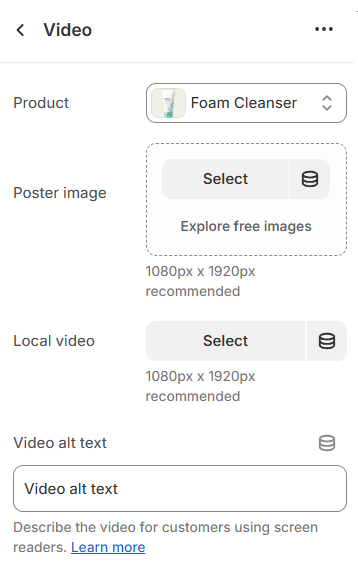
| Setting | Description |
|---|---|
| Product | Select a product from your store. |
| Poster image | Select an image for displaying as a poster (1080px x 1920px recommended) |
| Local video | Select a local video for displaying (1080px x 1920px recommended) |
| Video alt text | This setting is for describing the video for customers using screen readers |
No comments yet